Interface Overview
Launch U-Scope by running the u-scope executable (u-scope.exe on Windows).
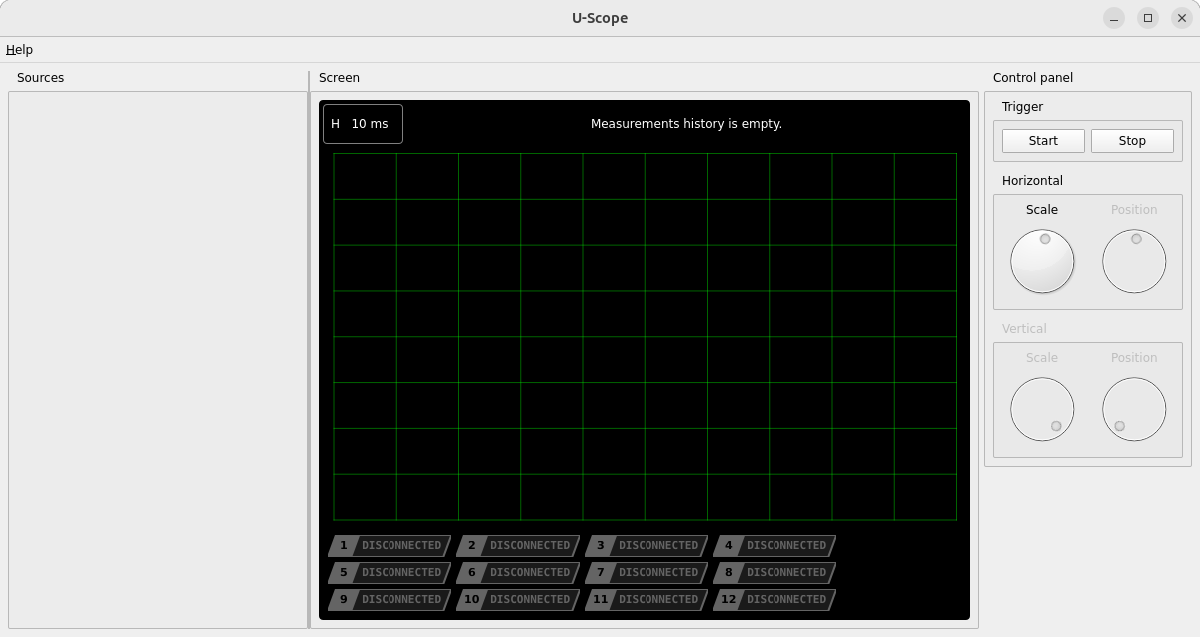
The main window is divided into three panes:
Sources
A configuration list of all active data inputs. Right-click within this pane to add a new source. Each configured source appears here along with the variables it exposes, which can then be assigned to display channels.
The Sources pane can be collapsed by dragging its edge below a minimum width.
Screen
The main graphical display area, made up of two parts:
- An overview strip at the top showing a sliding window over the full captured history (visible only in Stopped Mode).
- The main chart, which plots the currently selected time window across all enabled channels.
Control Panel
Core controls for data capture and scaling:
- Trigger — Start and Stop buttons controlling data acquisition.
- Horizontal — scale and position dials for the time axis.
- Vertical — scale and position dials for the currently selected channel’s amplitude axis.
Below the Screen pane, a channel bar shows all 12 channels as badges, used to enable, disable, and select channels for scaling. See Channel Assignment for details.